
Updated Tutor LMS Promo Codes, Get FLAT 55% Discount
Find the best Tutor LMS coupon codes and promo deals to save 55% on course creation plugins.

Looking to build a powerful online course platform without overpaying?
Unlock the latest Tutor LMS coupon codes and get a flat 55% discount on premium plans ideal for educators, entrepreneurs, and training professionals.
Tutor LMS is a robust WordPress learning management system plugin that empowers you to create, manage, and sell courses directly from your website. It sets the foundation for a scalable, learner‑centric experience.
Why pay full price when you can enjoy premium LMS functionality at discounted price, these verified Tutor LMS promo codes apply to annual and lifetime licenses unlocking access to advanced tools like assignments, frontend course builders, analytics, and subscription addons all while saving instantly.
Each coupon listed here is hand tested, valid, and up to date, so you can confidently grab the best offers without worrying about expired links. Scroll down to discover the top Tutor LMS discounts and start teaching smarter.
Latest and Verified:
Tutor LMS Coupon Code
Offer on Tutor LMS Individual Plan
Offer on Tutor LMS Individual Plan
Offer on Tutor LMS Business Plan
Offer on Tutor LMS Agency Plan
LMS Independence Day Sale- 30% OFF Valid For Limited Days
Tutor LMS Black Friday Deal – Up to 60% Off
Student Discount – 25% Off Tutor LMS Plans
Nonprofit Offer – Tutor LMS Discounted Access
Step by Step Guide:
How To Apply Tutor LMS Promo Code
In this section, we have some steps that you and follow and get a discount on Tutor LMS Plans.
Step-1: Select the Best Tutor LMS Offer on DigitOffers
Start by browsing the Tutor LMS offers we’ve shared above on this page. Choose the best discount that fits your needs and click the Get Offer button.
This will take you straight to Tutor LMS official website with your discount activated.
Step2. Visit the Tutor LMS Website
For the first move, you have to visit Tutor LMS official website and go to the pricing section from the top menu bar.

Step3. Select Your Plans
In the pricing section, you have options to select the plans of Tutor LMS.
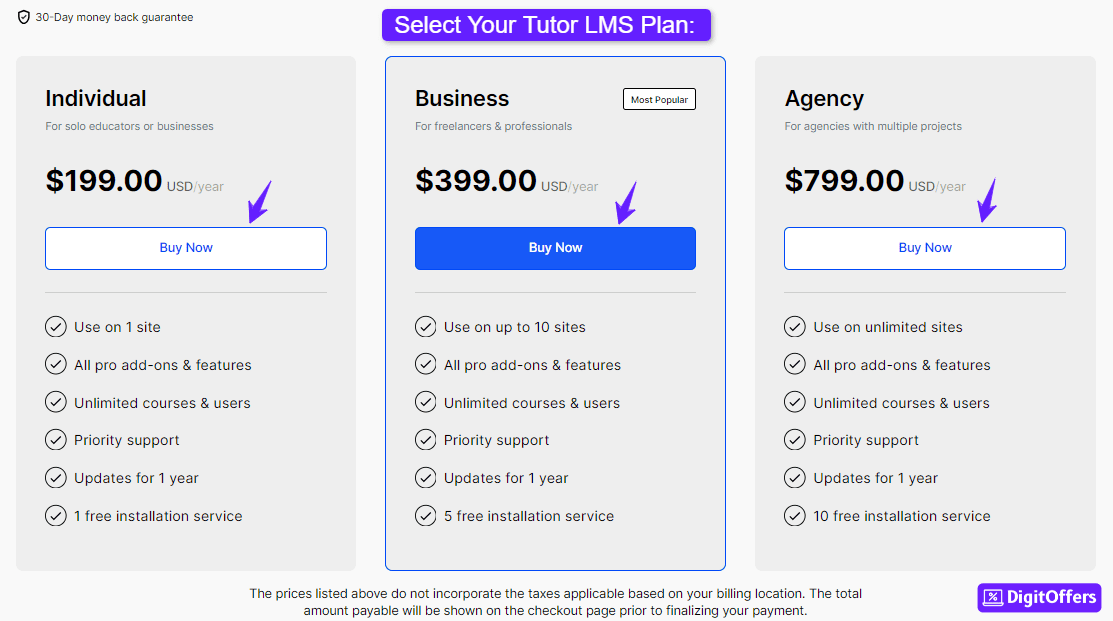
Tutor LMS has 3 plans:
| Individual | Business | Agency |
| Use on 1 site | Use on up to 10 sites | Use on unlimited sites |
| All pro add-ons & features | All pro add-ons & features | All pro add-ons & features |
| Unlimited courses & users | Unlimited courses & users | Unlimited courses & users |
| Priority support | Priority support | Priority support |
| Updates for 1 year | Updates for 1 year | Updates for 1 year |
| 1 free installation service | 5 free installation service | 10 free installation service |
Simply you can compare the plan and choose the best plan.
Step4. Create Your Account
To go with the further process, you have to create an account on LMS.
So you have to enter details like:
- Username
- Password
Just confirm your email, and your sign-up process will be done.
Step5. Enter Billing Details
In the section, you have to enter billing details. Like-
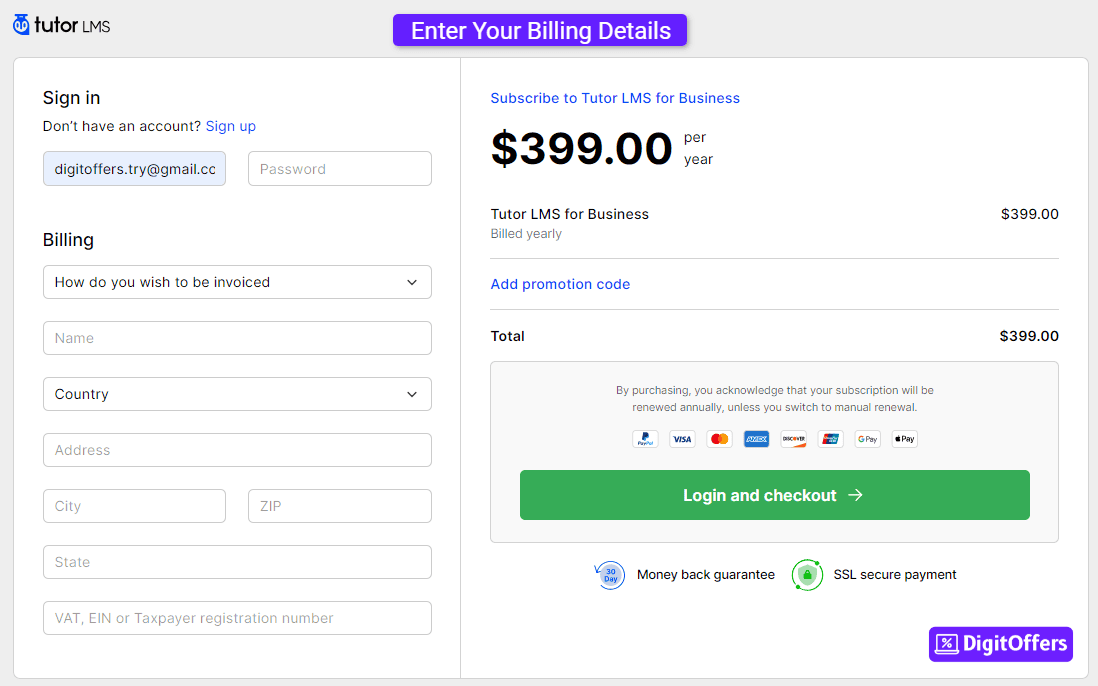
- Full name
- Country, State, Zip Code
- Taxpayer registration numbers
these three details are enough.
Step6. Enter Tutor LMS Coupon Code:
Tutor LMS provides an option to enter a promo code, If you have any Tutor LMS coupon, just enter it and get a discount on the plan you selected.
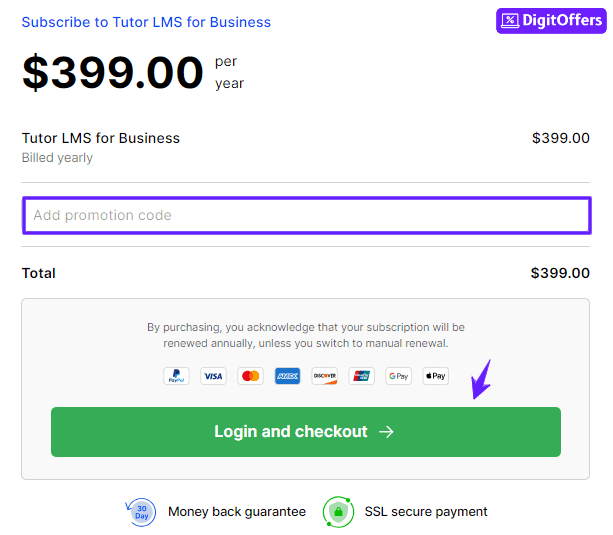
Step7. Complete Checkout Process
Now you have to enter your payment details, to make payment.
Here, you have two options to pay for your plans:
- Credit/Debit Card
- PayPal
Select your preference, enter your payment details, and you are done.
Tutor LMS Discount Summary
Tutor LMS is a WordPress plugin designed to help educators, institutions, and entrepreneurs build feature-rich eLearning platforms.
The plugin is available in three pricing tiers Individual, Business, and Agency each offering access to premium features like advanced quizzes, assignments, certifications, multi-instructor support, and more. Users can choose between annual licenses or a one-time lifetime purchase for long-term savings.
While the annual pricing suits users who prefer lower upfront costs, the lifetime plans offer the best value, especially for those planning to use Tutor LMS for the long haul
Tutor LMS Pricing Plans:
| Plan | Annual Price | Lifetime Price |
|---|---|---|
| Individual | $199 | $499 |
| Business | $399 | $999 |
| Agency | $799 | $1,999 |
If you’re serious about building a professional online course platform with WordPress, Tutor LMS’s flexible plans and lifetime deal options make it a smart and scalable choice.
- Tutor LMS Offers 3 Plans- Individual, Business, Agency
- Tutor LMS provides the option to enter the Promo Code
- You can get up to 30% discount on the Tutor LMS plan
- Tutor LMS Provides a 30-day money-back guarantee
Best Tutor LMS Saving Hacks
Tutor LMS is a powerful WordPress plugin for creating and selling online courses. Use these saving hacks to get its premium features without exceeding budget.
1. Save Up to 50% with Annual Plans
Tutor LMS offers significant savings when you choose annual billing over monthly payments. Paying annually helps you save up to 50% compared to paying month-to-month.
- Individual Plan: $199/year instead of $499
- Business Plan: $399/year instead of $899
- Agency Plan: $799/year instead of $1899
Choosing annual subscriptions is the easiest way to unlock these discounts and get premium features at lower rates.
2. Leverage the Free Plan for Basic Course Creation
Tutor LMS offers a free version with core features like course creation, quiz building, and basic analytics. It’s perfect for new creators or small businesses looking to test the platform before investing in premium upgrades.
3. Get Lifetime Access for One Time Payment
Tutor LMS offers lifetime licenses for its premium plans. This one-time payment eliminates recurring fees and helps you save significantly over time, especially if you plan to use the plugin long-term.
4. 30-Day Money Back Guarantee on All Purchases
Tutor LMS provides a 30 day full refund policy for all new purchases. If the plugin does not meet your needs or causes technical issues, you can request a refund within 30 days of purchase. Refunds do not apply to license renewals, and valid reasons must be provided to initiate a refund request.
5. Watch for Seasonal Sales and Discounts
During Black Friday, Cyber Monday, and other holiday events, Tutor LMS offers special discounts of 20% to 50%. Purchasing during these periods can help you secure the best possible price.
6. Bundle Add Ons with Premium Plans for Extra Value
Instead of purchasing individual add-ons separately, Tutor LMS includes advanced features like certificate builder, content drip, and course prerequisites in its premium bundles saving you money compared to buying add-ons separately.
7. Upgrade Anytime with Prorated Pricing
You can upgrade your Tutor LMS license anytime directly from your account dashboard. When upgrading, the cost is automatically prorated, meaning you pay only the difference for the remaining subscription period keeping your investment efficient.
8. Explore Demo and Pre-Sale Support Before Buying
Before making a purchase, you can explore Tutor LMS’s live demo and consult their pre-sale support team to clarify any doubts. This reduces the chances of dissatisfaction and ensures your investment suits your needs.
9. Choose the Right License Plan
- Single-Site Plan: Suitable for individual instructors and small businesses
- Business or Agency Plans: Designed for companies and agencies managing multiple client websites
By applying these Tutor LMS saving hacks including using annual plans, lifetime access, free trials, and choosing the right plan you can build and sell online courses while keeping your costs under control.
About Tutor LMS
Tutor LMS is a powerful and feature-rich WordPress plugin that enables you to create, manage, and sell online courses directly from your website. Whether you’re a solo instructor, educational institution, or a course marketplace, Tutor LMS gives you everything you need to build a full featured eLearning platform without writing any code.
The platform supports both free and paid courses, complete with customizable course pages, multimedia content support, and the ability to offer certificates upon completion. It is compatible with a wide range of plugins, such as WooCommerce, for monetization and subscription setups, and supports various payment gateways to enable smooth transactions.
With an intuitive course builder, drag and-drop tools, and support for quizzes, assignments, certificates, and monetization, Tutor LMS makes it easy to turn your WordPress site into a professional online learning hub.
Key Features of Tutor LMS
- Drag-and-Drop Course Builder – Create comprehensive online courses with lessons, topics, quizzes, and assignments using an intuitive drag-and-drop editor.
- Quiz and Assessment Tools – Design multiple-choice, true/false, fill-in-the-blank, and open-ended quizzes with detailed reporting to track learner performance.
- Monetization and Payment Gateways – Sell courses individually or as bundles using WooCommerce or Easy Digital Downloads and support multiple payment gateways.
- Student Dashboard and Progress Tracking – Provide students with a branded dashboard where they can view enrolled courses, track progress, and download certificates.
- Certificates and Badges – Automate issuing of completion certificates and achievement badges to encourage student motivation and reward progress.
- Front-End Course Submission – Allow instructors or guest authors to create and manage courses directly from the front-end interface, streamlining instructor onboarding.
- Add-ons and Integrations – Extend functionality with official add-ons for features like Zoom integration, assignments management, grade book, course reviews, and multi-instructor support.
Tutor LMS is the perfect solution for creating a scalable, flexible, and engaging eLearning platform on WordPress. Whether you’re teaching a single course or building a full-fledged academy, Tutor LMS gives you the tools to succeed online.
Conclusion – Tutor LMS Discount
Tutor LMS is a powerful WordPress plugin that makes course creation simple, professional, and scalable. With the right discount, it’s even easier to build and sell online courses without stretching your budget. Whether you’re an educator, coach, or entrepreneur, Tutor LMS gives you the tools to grow your eLearning platform with confidence.
We’ve shared the latest Tutor LMS coupons and verified promo codes to help you save on premium features like content drip, advanced quizzes, certificates, and more. These deals are ideal for both first-time users and those looking to upgrade their existing plan.
Stay connected with DigitOffers for updated Tutor LMS discounts and other top digital tool offers. We’re here to help you create impactful learning experiences at a better price. Don’t forget to check back for new savings and seasonal promotions throughout the year.
FAQs
Related Queries
Discover answers to common questions about Tutor LMS’s refund policy, nonprofit discounts, plan upgrades, and best pricing strategies.
Does Tutor LMS offer a money back guarantee?
Yes, Tutor LMS provides a 30 day money-back guarantee on all premium license purchases. If you are not satisfied, you can request a full refund within 30 days of your purchase.
Does Tutor LMS offer nonprofit discounts?
Yes, Tutor LMS offers a 30% discount to eligible nonprofit organizations. After verifying nonprofit status, organizations can access ongoing discounted pricing.
Does Tutor LMS support free trial periods for memberships?
Yes, Tutor LMS allows you to create trial periods for your paid memberships, giving students limited-time access before charging them for full access.
Are there seasonal sales or special discounts available?
Yes, Tutor LMS regularly offers discounts during Black Friday, Cyber Monday, and other seasonal events, where you can save significantly on premium plans.
Can I upgrade my Tutor LMS plan at any time?
Yes, Tutor LMS allows you to upgrade to a higher-tier plan whenever needed. The cost will be automatically prorated based on your remaining subscription time.
How does Tutor LMS handle prorated upgrades?
When upgrading, you only pay the price difference between your current plan and the higher plan, adjusted based on the unused period of your active subscription.
Can I downgrade my Tutor LMS plan?
Yes, you can downgrade your plan through your account dashboard. Downgrades take effect at the start of your next billing cycle.
Are there any discounts on license renewals?
Tutor LMS does not offer renewal discounts to standard users. However, nonprofits using discounted plans continue to receive their 30% savings upon renewal.
Does Tutor LMS take commissions from course sales?
No, Tutor LMS does not charge any commissions on your course sales. You retain 100% of your revenue, minus payment processing fees charged by your payment gateway.
What’s the best way to save on Tutor LMS?
To maximize savings, buy during seasonal sales, use the nonprofit discount if eligible, upgrade plans only when necessary for prorated billing, and rely on the 30 day refund policy to minimize risk
In this Page above, we have mentioned various coupons and discounts related to Tutor LMS.
Can I switch between monthly and yearly billing?
Tutor LMS plans are offered as annual subscriptions. You can change your license type when upgrading or during renewal but monthly billing is not currently available.
Are refunds available after upgrading or renewing a plan?
Refunds are offered only within the 30-day money-back period after your initial purchase. Renewals and upgrades outside this period do not qualify for refunds.